Showing posts with label WMS. Show all posts

Thursday, July 31, 2014

Open Academy Internships - Proposal

I've been invited to participate in the Open Academy through LocationTech.  Or to submit a proposal, anyway.  This would mean interns working on WhirlyGlobe-Maply for class credit.  I'm organizing my proposals here along with a bit more detail than I can provide elsewhere.  If you, my users, have an additional ones, add them in the comments.

Requirements


If you're going to work on WhirlyGlobe-Maply, you need an Apple Mac running OS X.  And you will at least need Xcode 5.1 or better.  You can run on the simulator without an account, but if you want to run on hardware (and you should), you may need an Apple developer account.  Please discuss this with your professor first.

Though WG-Maply does have an Android version, it's not yet mature and I'm not willing to support students using it yet.  Perhaps next year.

Possible projects


Here are a few projects that I think would be interesting for a computer science student with some exposure to mobile development.  Most of these focus on open standards and some on open data.

These projects will go into the contributed area of the WG-Maply project.  None of them require internal changes to the toolkit (a good thing) so they can sit outside the main library.

Keyhole Markup Language (KML)


KML has an interesting history.  It's basically the internal format for Google Earth, but due to its ubiquity it's turned into something of an interchange standard.  It's ill suited for this, but you'll find that happens a lot.  Might as well roll with it.

This project would be adding KML support to WG-Maply.  There are several parts to it.

  • Read KML - There's an API, so that's not too bad.  It's C++, though, so you need to know C++.
  • Interpret KML - This is where the C++ comes into play.  The API was written with Design Patterns very much in mind.  It'll be less annoying if you've had some exposure to that (but it will still be annoying).
  • Convert KML to WG-Maply concepts - The last bit isn't too bad.  Convert their markers into WG-Maply markers and so on.  The concepts don't map 1:1 which is what makes it interesting.
There are abundant KML examples out there for testing.  We'll find you a few.

I'd recommend starting with the static KML data.  If you're feeling ambitious, you can move on to the dynamic stuff.


Web Feature Service Support


WFS is one the OpenGeospatial Consortium (OGC) standards.  It's for expressing features, by which they mean points, lines, polygons, that sort of thing.  This is basically map data and can be overlaid on a map or globe in WG-Maply.  Or both.  Up to you, really.  The project is to display WFS in WG-Maply.

Using WFS requires a server.  I'll find you one or set up a GeoServer myself, if need be.  Once you've got an end point to talk to, there are three parts to this:

  • Form the query for what to fetch.  This will be XML, but there are XML libraries for Objective C that work pretty well.  This will take longer than you think it ought to.
  • Parse the Geospatial Markup Language (GML) that comes back.  I don't know of a good Objective-C parser for GML, but we'll look.  In any case it's XML underneath, so you may need to interpret that.
  • Convert the GML concepts into WG-Maply data structures.
The goal here would be to talk to a GeoServer and display the features it sends back for a certain area.  For bonus points, hook this into the MaplyQuadPagingLayer.  We use that for fetching data as we need it, rather than all at once.

MapCSS Support


Turning vector features into a readable map is an ongoing problem.  There are lots of ways to do it, but most of them are at least a little complex.  And for good reason, the problem is complex.  But it would be nice to have some simpler alternatives.

Right now the most common way users style their maps in WG-Maply is with Mapnik XML.  They usually produce this with CartoCSS in TileMill.  There are other approaches supported by other tools, such as MapCSS.

The project is to implement a decent MapCSS parser in Objective-C (or at least a wrapper).  Test it by displaying MapCSS styled maps in WG-Maply.  This would pair nicely with the GeoPackage support below, but I wouldn't recommend taking on both.

TopoJSON Support


There are a couple of newish standards out there that went around (e.g. ignored) the traditional geospatial standards process.  This makes them a little wonky in places, but also a lot easier to implement.  The first one is GeoJSON, which is well supported in WG-Maply.  The second is TopoJSON, which is not.

The goal of this project is to implement TopoJSON support.  This is not as complex as the other projects, but is pretty valuable.  Lots of people use these standards.

You'll need to parse the JSON itself, which is pretty easy on iOS.  Then you'll need to reform the topology and turn it into MaplyVectorObjects to display in WG-Maply.

If you're feeling ambitious, write an editor.  Since TopoJSON preserves topology, moving individual points around can be done without destroying the larger structures they're part of.  If you do this, you'll also want to write the TopoJSON back out.

GeoPackage Support


Let's get back to the official standards.  GeoPackage is a newer one from OGC that's meant to be used on mobile devices.  I don't run into it much yet, so let's see if we can help it along.

GeoPackage is simpler than it sounds.  It's based on SQLite which we use constantly on mobile devices and is well supported.  GeoPackage encodes features (e.g. points, lines, polygons and so forth) and provides for spatial searches.  That last bit is important on mobile devices, as we can only display so much at once.

The project is to support GeoPackage in WG-Maply.  I'd recommend doing this in two steps:
  • Support the vector features it encodes.  You can use the Spatialite toolkit to read them, apparently.
  • Make spatial queries in conjunction with the MaplyQuadPagingLayer.  That's how we load only the data we need to keep from overloading the display.
There are GeoPackage samples out there and tools for looking at the contents.  The goal would be to support as much as possible, with a minimum of getting the traditional point, linear, areal features displayed.  

This project would pair nicely with the MapCSS project or you could try styling the data with Mapnik XML.  Consider that the advanced part.

NASA Geospatial Imagery Browse Service


In an effort to make some of their data sets more accessible NASA has come up with GIBS.  It's a service that converts a few timely data sets into tiled data sets, covering much of the earth.  They provide simplified forms, such as Google's (and OpenStreetMap's) TMS.  That makes it easier for dumber systems (like mine) to display the data.

Actually displaying one of their data sets is too easy.  We already do that with the MaplyQuadImageTileLayer.  This project is to make a browser for the GIBS data sets.  That is, to show the user what is available and let them decide what to display.

In addition to the simple TMS end points, GIBS also provides Web Map Service support.  This is a more complex standard (and how) with a lot more flexibility.  It can tell you a lot more about what's actually available.

The project is to talk to the NASA GIBS service and build a browser for it using WG-Maply.  This would consist of the following steps.
  • Talk to the GIBS service using WMS.  You'll need to make a capabilities request and then parse the results.  There's an existing WMS parser in WG-Maply you can start with.  NASA has added a lot more specific information to their WMS return so you'll need to interpret it.  This will take longer than you think.
  • Build a display for what you get back.  Sort the results into base and overlay layers and then let the user select them.  A couple of UITableViews will work well for this.
This project will look really cool, but it's balanced by the complexity of WMS.

Wrapup


Those are my proposed projects.  Some are trickier than others, but they all require Mac OSX and some iOS hardware.  If any of my users have other project ideas, feel free to chime in.  Remember that the purpose of internships like these is to teach, not to try and get free labor, so write accordingly.

If you're a student considering one of these projects, feel free to ask questions.  I'll be happy to provide more details.

Thursday, April 10, 2014

WhirlyViz: GeoTrellis Transit

With WhirlyViz 1.3 we have a lot more flexibility in how we talk to back end services.  I'm having a blast wiring up all sorts of interesting geospatial engines.  Today's is the GeoTrellis Transit API from Azavea.


You can outrun the zombie outbreak on a bike.


GeoTrellis Transit


You should go check out their web page, but I’ll give you the quick version.  GeoTrellis Transit provides an API for answering questions about a travelshed.  You can use it to figure out how far a commuter could get using standard modes of transportation from point A to a variety of points’ B.

Can't beat rail for getting around.


Presumably you’d use this for urban planning, decision making and such.  Seems useful and it's fun to play with in a wonky sort of way.

WhirlyViz Demo


The GeoTrellis example is right up top in WhirlyViz 1.3.  Feel free to install that and give it a go.  Tap and hold to move the travelshed’s center.


Like all the of the newer examples, the WhirlyViz configuration is controlled by Javascript.  It was fairly simple to talk to the WMS server they provide, even not explicitly using the WMS functionality in WhirlyGlobe-Maply.  Constructing the rest of the parameter string was a cinch.

Sunday, April 6, 2014

WhirlyViz 1.3 - Javascript Update

WhirlyViz is a geospatial visualization engine for mobile devices.  It's based on my WhirlyGlobe-Maply open source library.  With it, you can whip together a pretty data visualization for an iPad or iPhone.


I license the engine to clients, but the WhirlyViz app is free and the best demonstration of the engine itself.

Javascript


WhirlyViz is eminently configurable.  That's kind of the point, but I wasn't entirely satisfied with what we had in 1.2.  Now I know why.  With version 1.3 we've switched to Javascript.

Apple added support for JavaScriptCore in ios7.  They put together a fairly nice bridge between Objective-C and Javascript to go with it.  This gives you a clean, empty Javascript interpreter to use in your app.

That's just what I did.  WhirlyViz configuration files are now Javascript.  Whenever a user taps on something, or a remote vector tile needs to be loaded, or even when the visualization starts up you're running a Javascript function.

This example talks to a WMS server.


It's incredibly flexible and as long as it's not in the main rendering loop (good grief no!) still very fast.  There are other advantages too.

Everything Speaks JSON


These days every remote web service speaks JSON.  [Except for the ones that don't].  Using Javascript makes it much easier to decode a random JSON return value and do something visual with it.

SF Bay Area Bike Share

For example, several public bike share companies provide JSON feeds with up-to-the-minute station availability.  They have spatial data, but not as GeoJSON.  That's kind of annoying, but now easily fixed.
  • We fetch the appropriate feed in the script
  • Parse the JSON return and iterate through the records
  • Pull out location data and anything we might want to display
  • Convert the data to GeoJSON and hand it back to WhirlyViz

WhirlyViz still knows nothing about the JSON feeds from the bike share companies, it's just displaying GeoJSON with some styling info.  The script has all the smarts and, best of all, it wasn't all that much code.

Running Your Own Script


WhirlyViz has its own URL scheme for displaying data.  Refer back to this post for details.

Now you can run your own Javascript configuration file too.  Just specify it like so.


The script argument tells WhirlyViz we're running a script and the js argument tells it where to go get it.  Of course, then you have to write one of these and the documentation is... lacking.

Wrapup


You can see some of the new examples in the latest WhirlyViz update.  I'm now talking to two new geospatial data services which will get their own blog posts.

I'm very happy with this approach and I'll be writing up the Javascript functions shortly.  You can kind of figure it out from the examples, but documentation is important.

In the mean time, if you have a neat visualization you'd like to see on mobile, hit me up and we'll talk.

Tuesday, August 20, 2013

WhirlyGlobe-Maply 2.2

I've been working on 2.2 for a few months now, ever since 2.1 was released.  There's a lot of new stuff in this version.  So much that I've been actively delaying writing it up.

Let's get on with it!  Here's what's in WhirlyGlobe-Maply 2.2.


Base Map Display


The quad paging layers changed radically in this version.  I talk a bit about the underlying technology elsewhere, suffice it to say that they draw fast.  Real fast.

In addition to that (which is big), I've also exposed a lot more functionality at the Component level.  Now you can do tricky stuff like this.


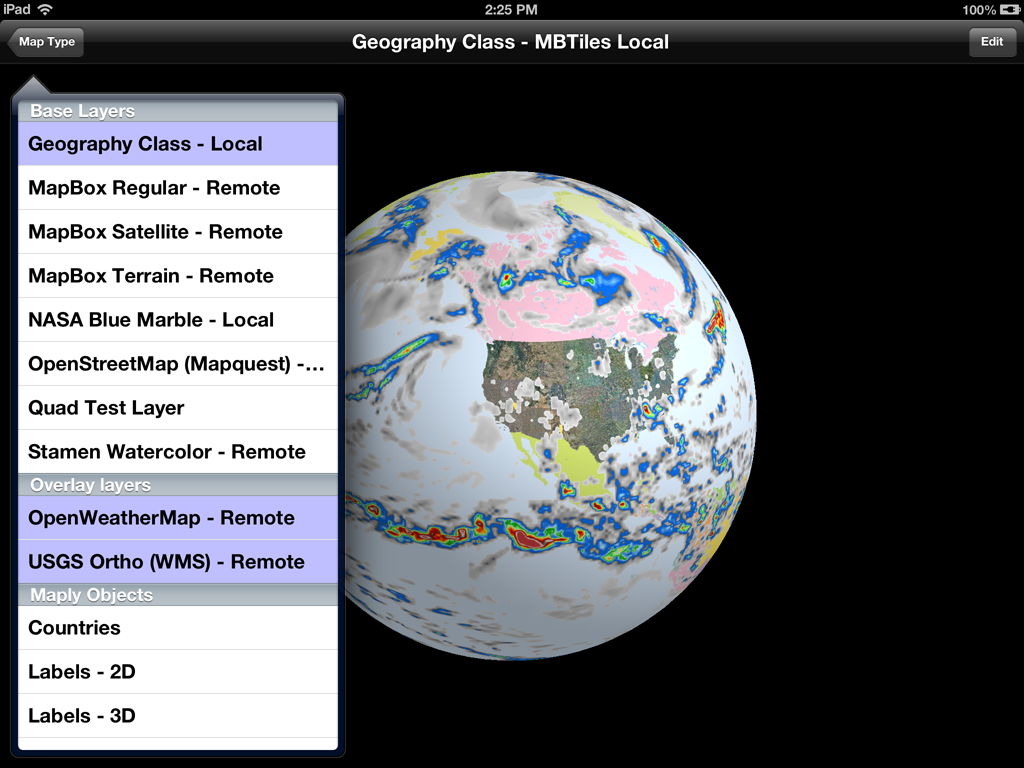
That's three base maps stacked on top of each other:

  • My variant of Geography Class, paged locally.
  • USGS Ortho photos coming from their WMS server
  • Transparent weather data from the OpenWeatherMap server

Each of those layers is independent, with its own coordinate system, level range and protocol.  You can now stack these things up to your heart's content and control their order.  And it's fast.

In addition to my own low level layers, you can also make your own.   Just create a MaplyQuadEarthTilesLayer and hand it an object implementing the MaplyTileSource protocol.  Have that object return an image for a given tile and off you go.  It even uses dispatch queues.

Vector Paging Layer


Though vector display hasn't changed all that much in 2.2, I have added high level support for paging your own data sets.  We organize base image maps as tiles and we can do the same with vector tiles.

OpenStreetMap vector data

In this example we're paging vector data from the US OpenStreetMap server.  That's an experimental setup where they're serving up GeoJSON tiles, sort of like what we used for images.

You don't have to have GeoJSON or anything specific.  Just create a MaplyQuadPagingLayer and fill in the MaplyPagingDelegate protocol.  You create the visible objects associated with your tile and the Component handles everything else, including cleanup.  It's also multi-threaded.

ZBuffer Control / Draw Priority


This one's a bit low level, but really useful.  You can now control which features respect the zBuffer (or ignore it) and which write to it.  That's incredibly useful for features you want to stick right to the globe.


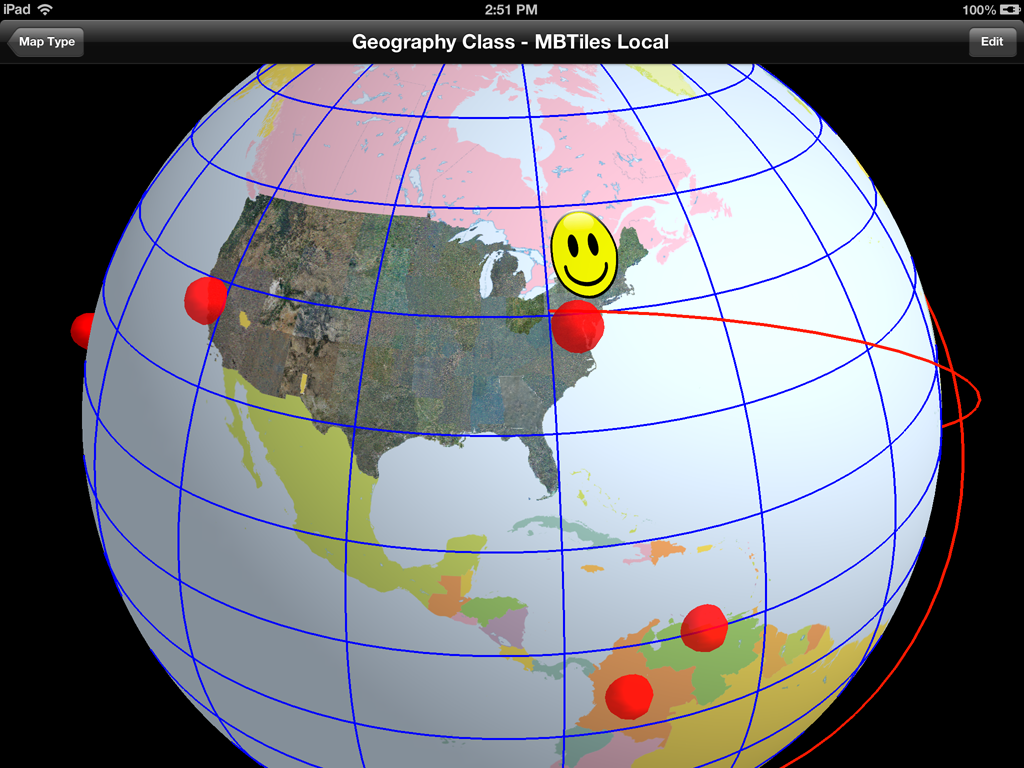
From the picture, here's how the standard defaults play out.

  • Geography class is the base layer at priority 100.  It writes to the zbuffer, but doesn't read.
  • The USGS Ortho layer is next around priority 101.  Also writes to the zbuffer, but doesn't read.
  • Next, we draw the stickers (priority 30,000) which neither read from nor write to the zbuffer.
  • Grid lines (in blue) are drawn next (priority 50,000).  They ignore the zbuffer entirely and have a tricky little shader program to deal with the lines behind the globe.
  • Lastly, we throw on the shapes, including those spheres and the great circles (with altitude) at about priority 80,000.  They read from the z buffer, but don't write to it.
There's also a little book keeping for skirts.  What are skirts?  Do you see any obvious lines between levels in the base map?  That's what skirts do.

That's all without the dreaded drawOffset; drawPriority now rules the day.

Anyway, that's all with the defaults.  Odds are you'll never need to set any of this yourself, but it's there if you do.


Text Fonts & Layout


We've now got a font glyph manager.  It's not too tricky, but it speeds things up and (potentially) saves a lot of memory.


We used to render each label in Quartz, which worked great, but was kind of slow and a memory hog.  Now when you ask for a label, it renders the appropriate glyphs, saves them to a giant texture atlas and makes up the polygons for your string.

When you delete the string, it may delete the glyphs as well.  So feel free to use weird fonts with impunity.


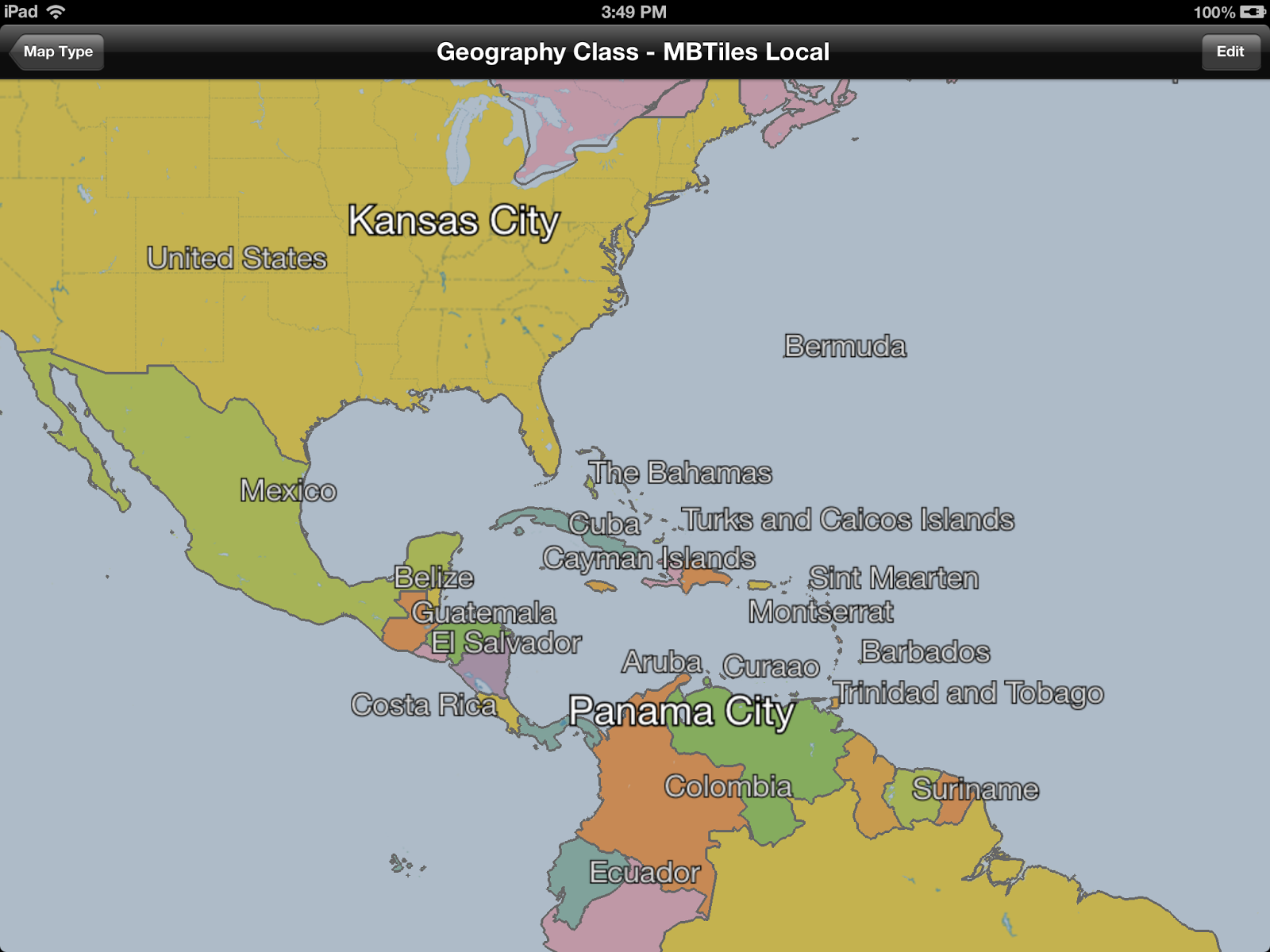
Labels now support a wider range of features, including an outline color and size.  That's nice for maps with cluttered backgrounds.

The layout engine is a bit more sophisticated as well.  It can handle rotation and does a better job with justification.

Vectors & Lofted Polygons


The toolkit can now tesselate large, weird polygons.  Why?  Because sometimes you get large, weird polygons.

Oh goodie, lakes.

This is useful in a couple of places.  First, the kMaplyFilled attribute works a hole (pun intended) lot better on vectors.  Second, the lofted poly layer is a lot faster.  Tapping Russia is now interactive.

Ha ha.  Red.  I get it.

Thread Control & Active Objects


Now for the obscure stuff.  You can add things on the main thread!  Gasp!  Wait.  What?

That little sphere is moving.  Just keep staring.
WhirlyGlobe-Maply likes its threads, it uses a bunch of them.  We try to do everything on either the layer thread or in custom dispatch queues.

Well great, but what if you want to change something RIGHT NOW.  You know, if you're editing it.  Or maybe animating it.  Now you can.

All the usual add calls (i.e. addScreenLabels:) take a mode: parameter.  Right now the mode is either MaplyThreadAny (the old way) or MaplyThreadCurrent.  For the latter we do the deed right now on the thread we're currently in.

There's also a new MaplyActiveObject, which is wrapper around a callback you get right before the next frame draws.  This is how you animate if you're so inclined.  Use it wisely.

Screen Space Calculation & Tilt


The toolkit spends a lot of its time trying to figure out what to load and when to load it.  It does this by deciding how big things are on the screen.  That works fine if you're staring straight down, it gets trickier if you're not.

Crazy!  Who knew?  Well I knew, I was just avoiding it.


And now I'm not avoiding it.  We can display the sampled curved surface of a globe when looking outward.  That was fun.

You can mess with the tilt in a WhirlyGlobeViewController.  This can get tricky, so check out the setTiltMinHeight:maxHeight:minTilt:maxTilt: method.  That'll muck with the tilt as you get close to the ground in a somewhat intuitive fashion.

Maply (2D) Changes


Support for the 2D/3D map mode is fleshed out a bit more.  I think you can actually use it for apps now, because... well... I have.

Like a Globe, only Flat.

There's a true 2D map mode now, where you can turn off lighting and even tie the map to a UIScrollView.  It's a bit... tricky yet.

The gestures could use a bit of work and I'm getting a better idea of what users might want (hint: looks like MapKit).  There will probably more of this in 2.3.

Component vs. WhirlyGlobe-Maply API


I used to stress the difference between the low level WhirlyGlobe-Maply API and the high level Component.  The API uses a combination of C++, STL, Boost, and apparently MADNESS.  I'm just pushing the WhirlyGlobe-Maply Component these days.

In fact, most of my clients are using the Component, so all the good stuff gets exposed there.  Point being, just use the Component.

Other Stuff


There's a lot of new functionality in WhirlyGlobe-Maply 2.2.  Did I mention custom shaders?  I did not.  The low level rework that'll make Android porting easier?  Didn't really go into that.  How about elevation data?  Yeah, it's there, but you need your own data.  Don't have that... let's wait until 2.3.

And, oh yeah, the WhirlyGlobe-Maply Component Tester app has been heavily reworked to show all this off.  Check that out for examples.

The Future


I'm putting 2.2 into Beta shortly.  It'll go active on the main branch on github, then we'll update the pod specs, the documentation, and the binary distribution.

After 2.2 I'm looking more toward map related features.  The globe is fun, but maps (vector and image) are a bigger user base.  Rather than crazy high end stuff (which my clients like), I need to put some time into making things easier to use.  Annotations are an obvious problem, as is area based update.

Of course, clients pay the bills, so expect more high end craziness as well.

Thursday, July 25, 2013

Web Map Service (WMS) Support

The Web Map Service protocol has been around a while.  A long while.  I just got around to implementing it in WhirlyGlobe-Maply.

Add witty caption
Of course the toolkit has been able to do this sort of thing since 1.0, but with a variant of TMS.  I think.  You know, what OpenStreetMap and Google publish.  Bing does something weirder.

Anyway, you can do WMS now in your WhirlyGlobe or Maply app.

The Code


All this is in WhirlyGlobe-Maply 2.2, a rather massive update to the toolkit I'll be publishing shortly.  It's in the develop branch if you're feeling frisky.

Here's how you'd add the NAIP ortho quads to your globe (or map).

Pretty simple, actually.  Here's all we're doing.

  • Create a coordinate system that describes good old WGS84 lat/lon.
  • Setting up a tile source to point to the WMS end point.
  • Starting a new layer which uses that tile source.

Incidentally, you can write your own tile sources now.  The code for MaplyWMSTileSource is pretty simple and it lives at the Component level.  That means it's entirely Objective-C.

Oh, and I don't think you should do this for WMS sources you don't own.  WMS is much more general and I'm using it for tiles, which is... yeah.  Anyway, be sure you know what services you're hitting and how they feel about it.