Friday, March 4, 2016

CartoType GL

In cooperation with CartoType Ltd, I am proud to announce CartoType GL for iOS and Android.

Parks are green!

CartoType GL is the next generation of the CartoType map toolkit.  It's got all the flexibility of the existing library for map representation, routing and address searching, but we've add a zippy OpenGL ES renderer.

What is CartoType?


CartoType is an offline map library that works with limited resources.  This makes it popular on smartphones and other situations where the user is not connected to a network.  It can handle a variety of data inputs, making it easy to use your own data, but can also deal with the usual OpenStreetMap cases.

I wonder where this is?

The existing CartoType library does a really nice job representing complicated maps in a very small space.  It's primarily a static map rendering library, so when you use it on a smartphone it'll render the map when you stop moving.  What we've done is upgrade the renderer.

What is CartoType GL?


CartoType was already doing a fine job representing maps.  What it needed was to draw them faster.  CartoType GL is just what it sounds like, an OpenGL ES based version of CartoType that solves the speed problem.


CartoType GL marshals the resources of the existing library to convert data to internal vector tiles.  Those are are processed into OpenGL ES compatible data and rendered at a nice zippy, interactive speed.  Basically just what you'd expect in a modern map toolkit.

Online vs. Offline


There are some excellent cloud based map solutions out there for map representation, routing, address searching and so forth.  CartoType GL is not that; it's an offline solution.

I have no idea where this is.

Why offline?  Well, it's actually a different problem.  You can cobble together offline solutions from the online technology, but they're not great.  They're too big, they don't do routing well and they're focused on display.  If you want to do a good offline map toolkit it's a different beast.  That's what CartoType is.

Cost & Availability


CartoType GL is, logically enough, being sold through the CartoType company.  They are the ultimate source of details on this effort.  Contact them for a license.

We hope to get the iOS version out in April.  Android should follow shortly after that.

Boring Technical Details


WhirlyGlobe-Maply is the open source toolkit we (mousebird consulting inc) make and it has two levels.  The core is a C++ rendering and object management engine.  Above that is an Objective-C interface on iOS and a Java interface on Android.

CartoType GL uses the core C++ renderer directly.  Rather than expose high level WG-Maply functionality, we interface with the GL renderer.  This makes CartoType GL a much simpler map centered toolkit.

WhirlyGlobe-Maply is and will continue to be open source.  This arrangement is just like one of the commercial apps that we work on.  It's even contributing functionality back, making the toolkit better for everyone.

Wednesday, March 2, 2016

WhirlyGlobe-Maply 2.4

Version 2.4 is officially out!  It's been a while in the making.  Too long, really.

Version 2.4 is pretty.

For a list of features, go check out the list of features blog post.

If you're building a regular 'ol app using the toolkit, just grab the master branch or use the binary version, take a look at the documentation and get started.

Coming Up Next


The Cocoapod will be updated soon.  I'll edit the post.  But honestly if you're that excited to use the pod, just use the one we have in the repo.
[Edit: We've got the Podspec for version 2.4 up and running.]

We're already working on version 2.4.1.  Have been for months, really.

Thursday, February 25, 2016

Marker Clustering

Let's continue with the new map features and look at a really cool one paid for by Miizee.


The number one response to marker clustering has been "I thought you already did that."  So I guess we were on the right track.

What is Clustering?


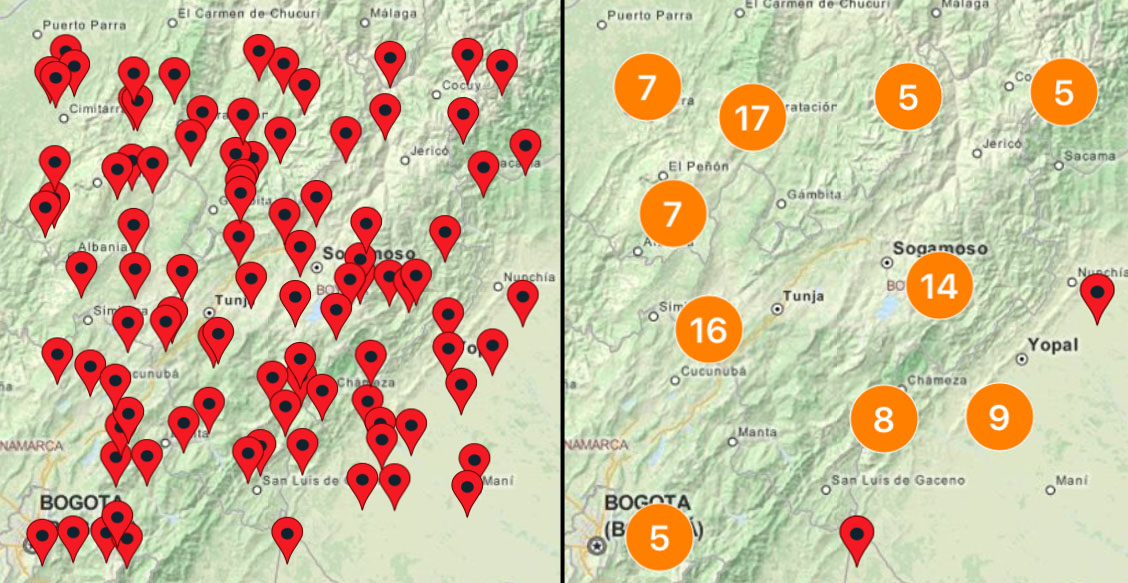
It's easier to show than tell, but I'll belabor the point.  Clustering is when you take a bunch of markers that would normally overlap and turn them into a single grouped marker.  It's meant to make your map more readable.


Clustering works both on the map and the globe.  It's easy to access and to modify.

Cluster Specifics


If you're already making MaplyScreenMarker objects and letting the layout engine handle them, then it's easy to cluster.  Just add the attribute kMaplyClusterGroup and set it to 0.

Already know I'm going to be tired of orange

Cluster Group 0 is set up by default and will make orange clusters with a number in the center.  Since clustering is a function of the layout engine it'll fire off on a regular schedule and clusters will interact with other markers and labels.

Let's look at a simple example.


That sets up a few markers, then asks the system to cluster using the default cluster group.

Selection works too.  If the user taps on a cluster group, you get all the individual markers back.  They're tagged as part of a group too.

Rolling Your Own


We've set up the default clustering mechanism with an instance of MaplyBasicClusterGenerator.  You can set one of those up yourself and add it to the MaplyBaseViewController.  You can even overwrite the kMaplyClusterGroup for 0 and change the defaults.

The MaplyBasicClusterGenerator gives you access to a variety of attributes, such as:
  • The image used for a cluster background.
  • The animation time for markers joining and leaving a cluster
  • The shader to use for movement.
If that's not enough control, you can just subclass MaplyClusterGenerator and control it all.  When asked, you'll return a UIImage and the size of the marker you're creating.  The system will handle the rest, including texture atlases, animation and cleanup.

Behind The Scenes


There's obviously some cool stuff going on here.  Not only are clusters very flexible, they're fast.

Clustering is hilarious around the edges
Several versions ago we started using OpenGL ES shaders for the markers and labels.  This let us draw a lot of them, but also start treating them as normal geometry.  Animation and clustering are two of the more interesting results.

Wrapup and Commercial Plug


Enjoy the most popular feature you thought WhirlyGlobe-Maply already had!  Hopefully it's cooler than you already thought it was.  Let us know what other features we obviously do but may not have implemented yet.

Thanks again to Miizee who paid for this development.

Coming up, more map features!

Wednesday, February 17, 2016

We're Still Here

One of my competitors, Nutiteq just got bought by a partner company, CartoDB.  This is cause for some reflection.

Did you know WhirlyGlobe-Maply recently turned five?  That's right, I wrote the first of it in the winter of 2011.  Since then it's grown to more than 100,000 lines on two mobile platforms.

The 2 and the 3 D

The SDK is now a full time job for me and a part time job for a number of excellent contractors.  It's used in a wide variety really great apps and burns battery of tens of millions of devices.

So how did we get here?

Business and the Plans Thereof


I designed the SDK to be open source from the first.  This means cheap marketing which we parlay into contracting dollars.  It's a plan that's worked well, but it does have some drawbacks.

I'm excellent at tracking down new customers, but I'm awful at making third party deals.  Those are complex and require real business development, which is time consuming.  So we focus on the users and ignore the BizDev.  It does make us independent.

About Nutiteq


I'm sure reassuring emails are going out to Nutiteq customers right now.  It's going to be fine going forward, not to worry.  And it is a great move.  I commend CartoDB for their acquisition.

But if you're using Nutiteq's mobile SDK's you've got to be worried.  CartoDB is a venture backed company and they have plans they must execute.  Do you think those plans include your SDK license?

Switching to WhirlyGlobe-Maply


The danger with open source is that it won't do enough of what you want.  We're way past that point with WhirlyGlobe-Maply.  It's time to consider switching.

Our SDK is fantastic on iOS and has come along nicely on Android.  If you're a nervous Nutiteq customer, take a look.  You'll be pleasantly surprised.

Wednesday, January 27, 2016

Annotations

In the spirit of map features, here's another new/old one.

We just added annotations in WhirlyGlobe-Maply!  Like, maybe 2 years ago.  Let's just ignore the faded "Grand Opening" sign flapping in the wind and come on in, shall we?

The finger is invisible.  Like in capitalism.

They look just like you'd expect and they work well.  Let's see how.

Tutorial


If we haven't reminded you enough, there's a fancy WhirlyGlobe-Maply site with some great tutorials.  Two of them use annotations.


The vector selection tutorial pops up an annotation on selecting a vector and the marker selection tutorial... well see if you can guess.

Technical Details


The "new" object here is a MaplyAnnotation.  It's based on the SMCalloutView by Nick Farina and exposes much of that functionality.  That gives you enough control for almost all cases.

If you need something different, there's still the old MaplyViewTracker, a much lower level interface for dragging a view around the screen.

Adding annotations is easy, with the addAnnotation: method.  To remove them, call removeAnnotation: or clearAnnotations to get rid of them all.

If you're messing with an annotation, say the user tapped on it and you need them to edit something, you can also freeze an annotation in place.

Next Up


We'll continue the map focus for a bit, but it's going to get much more interesting.

Also, WhirlyGlobe-Maply 2.4 is just about to release.  Really.

Thursday, January 21, 2016

Infinite Scrolling

It's been way too long since my last post. And that means I've been busy. So many things to do. So many new features.  So much Android.

Stamen Watercolor + NAIP Ortho

But let's talk maps.

The Map, It is Flat


WhirlyGlobe-Maply isn't just about the globe.  There's that second part, the "Maply" bit.  That's a flat map.  It can also be a 3D map, but no one cares, they just use the globe for that.

Lots of users do use it as a flat map, though.  Sometimes (<cough> most times </cough>) that's the best way to present geospatial information.  And most of WhirlyGlobe-Maply's favorite tricks work in 2D.  Some are exclusively 2D.

Like infinite panning.

To Pan and Pan and Pan and Pan


Sometimes you need a 2D map of the whole world.  Sometimes you need to pan past the edge of the world and keep going.  Because that's how the world is.  Or would be if you stretched it out.  Or your map is near the date line.  That happens.

The nausea means it's working

This feature is baked into the MaplyViewController.  It's the viewWrap property and it's on by default.

The implementation is harder than it looks, particularly for annotations and selection.  So bask in our glory.  Or buy a support contract.  Maybe both.

Up Next


The globe gets all the press and the pretty pictures.  So we'll talk about some more map related features, like vector tiles and marker clustering.

And soon, WhirlyGlobe-Maply 2.4.  It's basically done, I just need kick it out the door.

Wednesday, October 28, 2015

WhirlyGlobe-Maply 2.4 Beta #8

The latest beta (#8) of 2.4 is available.

You have no chance to survive make your time.

You can get this one of three ways.

  • The binary release can be gotten there.
  • Cocoapods can be had directly from this URL or with the tag v2.4_beta8
  • You can just use the repo with the tag v2.4_beta8

That's just the framework.  I'll put together the test app and its data when the release is ready.

"Did I miss betas number 1 through 7?" you may be thinking.  Yeah, pretty much.  I made them for clients, but haven't been aggressively pushing them on users.

What's New In Beta #8


Well, it's all new to 2.4, so go check out the announcement post.

I am repeating myself, yes.

The pretty stuff is pretty, but the stability of 2.4 is really profound.  We've been integrating with a number of high traffic apps and have cleared up a lot of edge, corner, and middle cases.  This is a great release.

How Many More Betas


Probably just the one more beta.  Things are nicely stable and I've got a pretty short list of bugs I want to fix.  

After that, it's WhirlyGlobe-Maply 2.4.1 which... okay I'm already working on.